Guides / Set up on your trip
Set up a rented Starlink kit on your trip
Use this checklist to pack a rented Starlink kit and get it online at your campsite, cabin, or event. The setup steps come from Starlink's own guides.
Rent Starlink is a directory, so we don't rent, ship, or set up kits. Your rental company's listing is the final word on what's in the box.
Before you leave
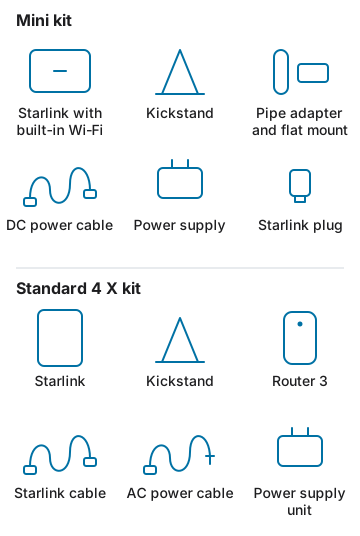
- Check what's in the box. Starlink's Mini kit includes the Starlink with built-in Wi‑Fi, a kickstand, and a power supply. It also has a DC power cable, a pipe adapter and flat mount, and a Starlink plug. A Standard kit has the Starlink, a kickstand, a separate router, two cables, and a power supply. Rental kits can differ, so compare what arrives with the listing.
- Get the Starlink app. Download it on your phone before you lose cell service. Starlink's setup guides use the app for the steps below.
- Plan your power. Starlink's spec sheets list Mini at 25–40 watts on average and Standard at 75–100 watts. See how much power Mini and Standard use to size a battery for your trip.
- Check the cable length. Starlink lists a 15-meter cable, about 49 feet, in both kits. Make sure it reaches from your power source to an open spot.
- Note the return details. Write down the return date, shipping steps, and what goes back in the box, as the company states them. For the rest, see what to confirm before you book.
Set up at your site
- Find a clear view of the sky. Trees, poles, and roofs can interrupt service as satellites move overhead. In the Starlink app, use the obstruction tool to check the spot you picked.
- Plug in Starlink. Lift the kickstand and push the cable into Starlink until the plug sits flush. On Mini, connect the other end to the power supply and plug it in. On Standard, plug the other end into router port 1, marked with an antenna symbol. Then plug in the router.
- Join the Wi‑Fi. On your phone, open Wi‑Fi settings and join the network named STARLINK. If you don't see it, check the instructions from your rental company.
- Align Starlink. Open the app. If Starlink needs to turn, the app shows an alert. Tap it to use the alignment tool.
If you can't get online
- Open the Starlink app and check for alerts, outages, or obstructions.
- Make sure each cable is plugged in all the way and isn't damaged.
- Unplug Starlink from power, then plug it back in.
- Still offline? Contact your rental company before you try a factory reset. Their listing should say how to reach support.
Things you should know
- If the ground spot is blocked, Starlink suggests a higher spot, like a roof, pole, or wall. Ask your rental company before you mount the kit anywhere.
- Kits, data plans, and support vary by company. The listing is the final word, not this guide.
- Planning a road trip? Read the RV and camping tips, or see RV and camping kits in the directory.